
GPS lap timer for track days
For the love of speed
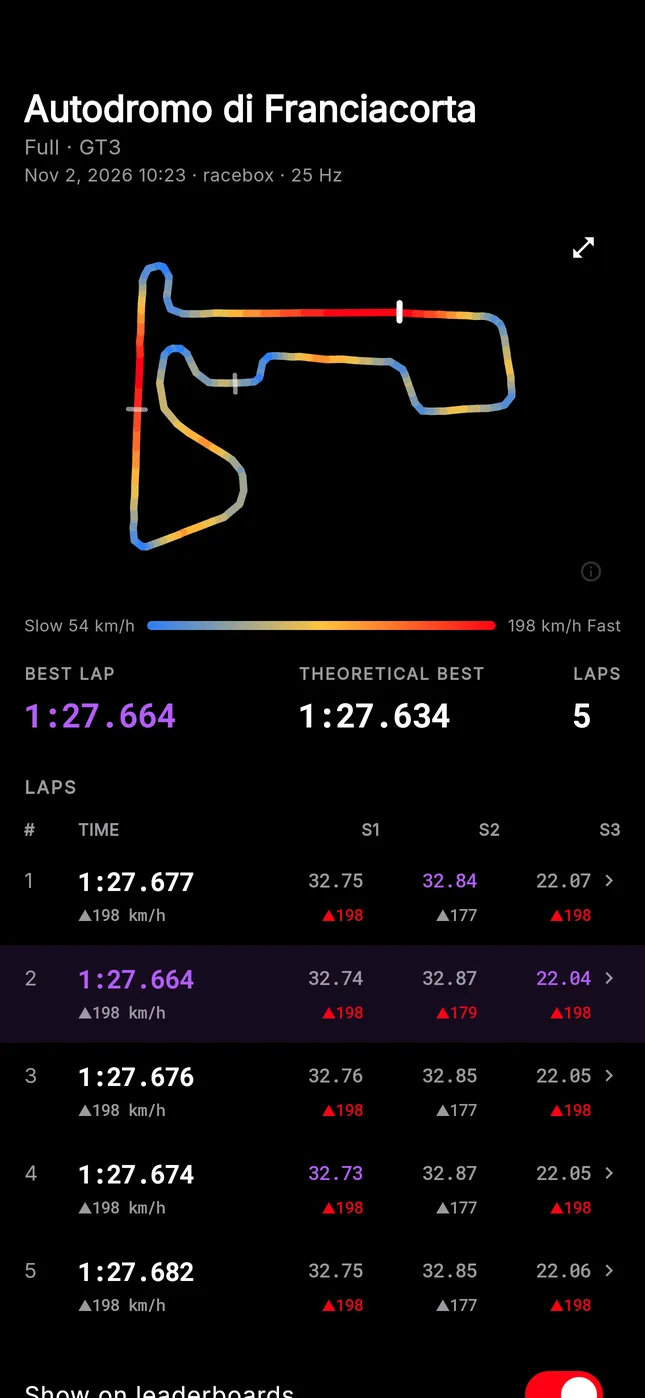
Speedy turns your phone into a lap timer. It finds the circuit, times every lap and sector live, and shows you where the time went once you're back in the paddock.


On iPhone and Android, and on the web for your computer.
Features
Everything from the pit lane to the feed
Time the lap, find where you lost time, read what the engine was doing, cut a video with your data on it, and post the result for your friends.
On track
Big numbers you can read at a glance
Put the phone on the dash mount and drive. Speedy recognises the circuit and the layout, then times everything for you.
- Lap and sectors
- The running lap time, each sector as you cross it, and the delta to your best lap.
- Layout detection
- Speedy finds the circuit when you start. After one lap it knows the layout, or you pick it yourself.
- Speed and G-meter
- Live speed, and a G-meter from the phone's accelerometer with the peak of each lap.
- Voice
- Hear your lap time and the gap to your best after every lap, without looking at the screen.
- No signal, no problem
- Timing keeps going offline. If the app closes, the laps are recovered from the GPS trace.
- Test drive
- Try the timing screen on any road. Nothing is saved.
Analysis
See exactly where the time went
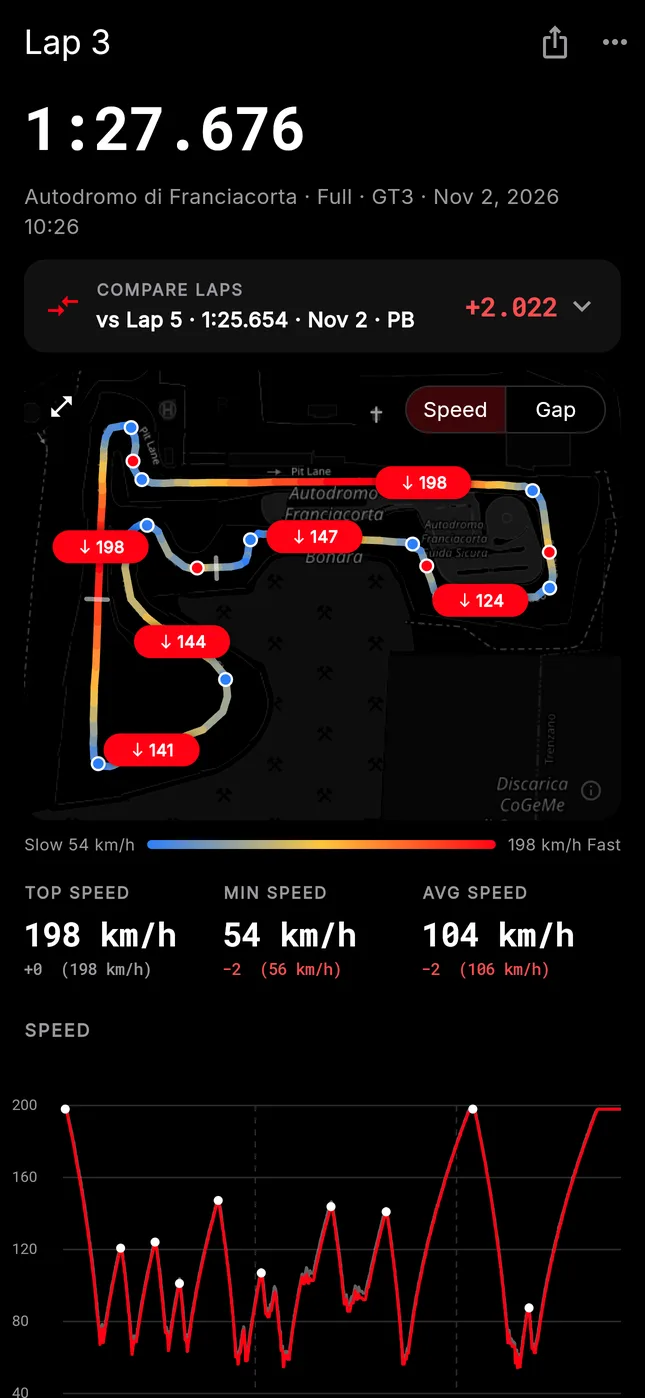
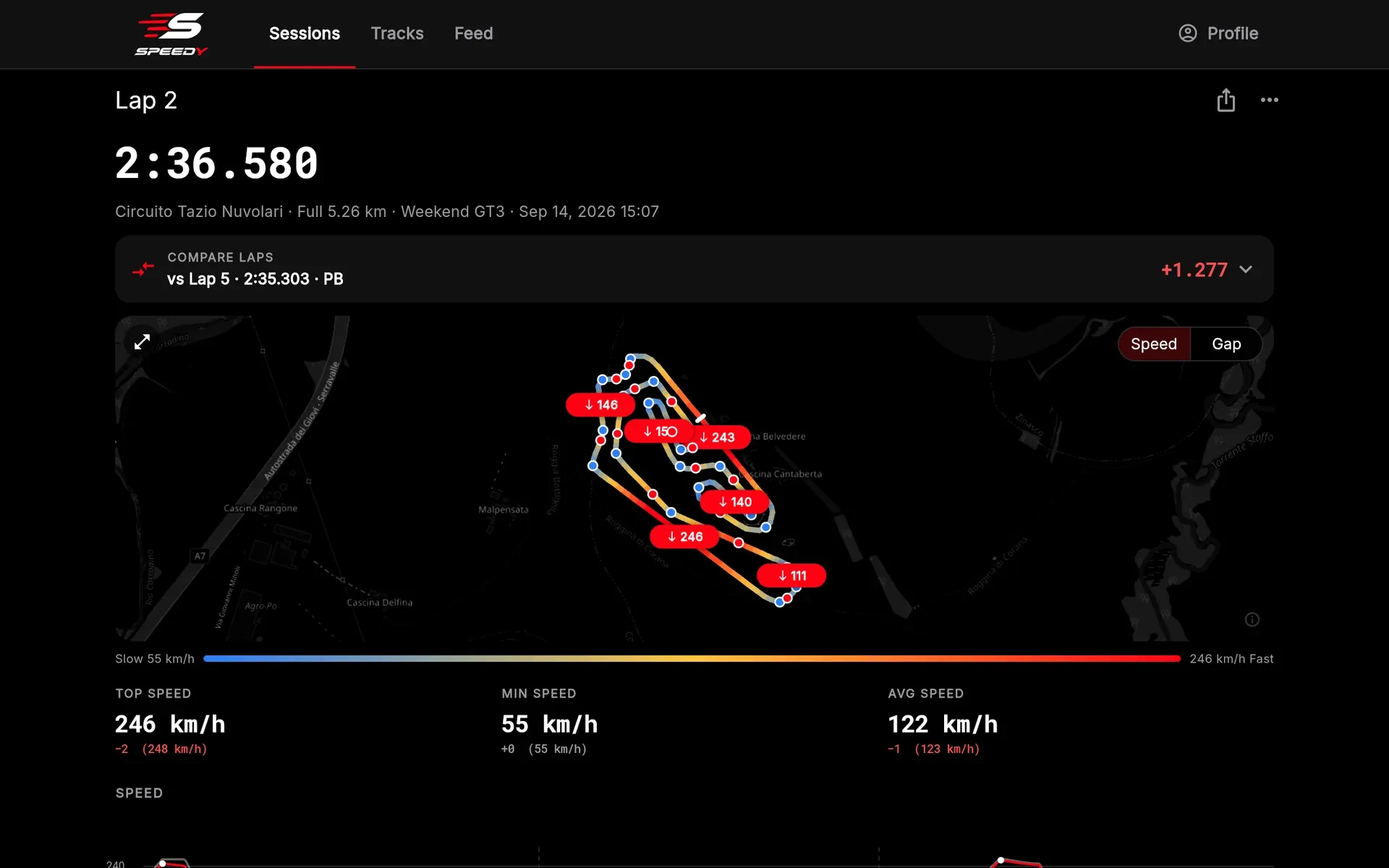
Every lap is drawn on the map and charted from start to finish. Pick any other lap, from this session or your personal best, and Speedy compares them corner by corner.
- Braking points and the slowest speed in every corner
- The gap to the reference lap, metre by metre
- Sector times, top speed per sector and your theoretical best lap
- Advice on the corners that cost you the most time
You braked 12 m earlier than on your best lap.
On the map
- SpeedColoured from slowest to fastest, with braking points
- GapWhere you were gaining and where you were losing
- ThrottleLifted to flat out, with an OBD-II adapter
Charts
- SpeedThe whole lap, against the reference lap
- Gap to referenceTime gained and lost along the lap
- EngineRPM and throttle, with an OBD-II adapter
Numbers
- Top, minimum and average speedWith the difference from the reference lap
- Sector and corner comparisonBraking and apex speed for every corner
- Where you lose timeBrake later, carry more speed, exit better, get on the throttle earlier
Engine data · OBD-II
Read what the engine was doing
Plug a Bluetooth LE OBD-II adapter into the car's diagnostic port. Speedy records engine data alongside the GPS, so every lap shows what your right foot and the engine were doing at each point of the track.
- Engine RPM
- Read as fast as the car answers, usually 5 to 15 times a second. Max RPM for every lap.
PID 0C - Throttle position
- How far the throttle is open, on the chart and on the map. Share of the lap at full throttle.
PID 11 - Coolant temperature
- The highest temperature of each lap, read now and then through the session.
PID 05 - Throttle tips
- See the corners where you got back on the throttle later than on your reference lap.
- Setting up
- Pair the adapter once in the app. It connects by itself every time you start a session.
- Adapters
- ELM327-compatible adapters with Bluetooth LE. Adapters that only use classic Bluetooth can't connect on iPhone.
Example lap, as shown on the lap page
Video overlay
Put your data on your onboard video
Speedy renders a 1920×1080 video as long as the lap, with your telemetry moving in real time. Lay it over your onboard footage in any video editor and line it up with the moment you cross the line.

HEVC .mov with alpha · iPhoneFor editors that support transparency: Final Cut, Premiere, DaVinci Resolve, LumaFusion.
MP4 · iPhone and AndroidFor any editor with a chroma key: CapCut, iMovie, InShot.
Garage and profile
Your vehicles, and every lap you drove in them
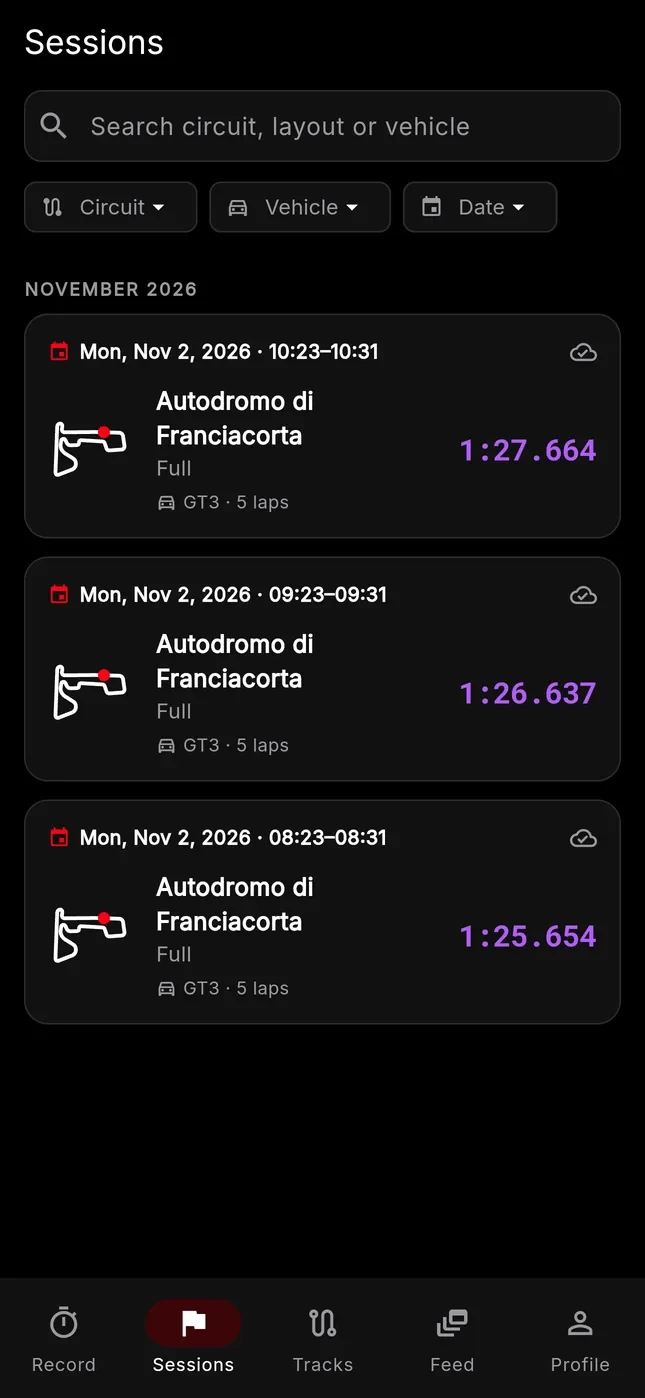
Add each car, bike or kart to your garage. Every session is saved with the vehicle you drove, so you can compare them on the same layout and keep the history of each one.
- Vehicle details
- Name, make, model, year, category, power, weight and your own notes.
- Photos
- Add photos of each vehicle and choose the cover. It's the picture on the cards you share.
- Categories
- Car, motorcycle, kart, formula or other. Leaderboards are split by category.
- Compare vehicles
- Your best laps in each vehicle on the same layout, side by side.
- History
- Search your sessions by circuit, vehicle or date. Archive a vehicle you've sold and keep its laps.
- Profile
- Photo, bio and country, your sessions, laps and circuits, posts, vehicles, followers. Public or private, in km/h or mph.
- Make
- Porsche
- Model
- 911 GT3
- Year
- 2022
- Power
- 510 hp
- Weight
- 1,435 kg
- Sessions
- 14
| Franciacorta · Full | 1:25.654 |
| Vallelunga · Grand Prix | 1:41.307 |
| Mugello · Grand Prix | 1:58.912 |
Example vehicle
Community
Share the lap, follow your friends
Turn a lap into an image with your vehicle's photo, the lap time and the circuit, and send it anywhere. Or post it to the Speedy feed, where the people who follow you see it.
- Share cards
- Story, post or square format, in a classic or minimal style, with or without sectors. Share to Instagram, WhatsApp and more, or save to Photos.
- Feed
- Post laps and photos with a caption. See what the drivers you follow have been doing, and like their posts.
- Drivers
- Find drivers by name or username, follow them, and see who follows you.
- Your rules
- Keep your profile public or private. Report or block anyone, and their posts and laps disappear for you.
Leaderboards
See how you compare with other drivers
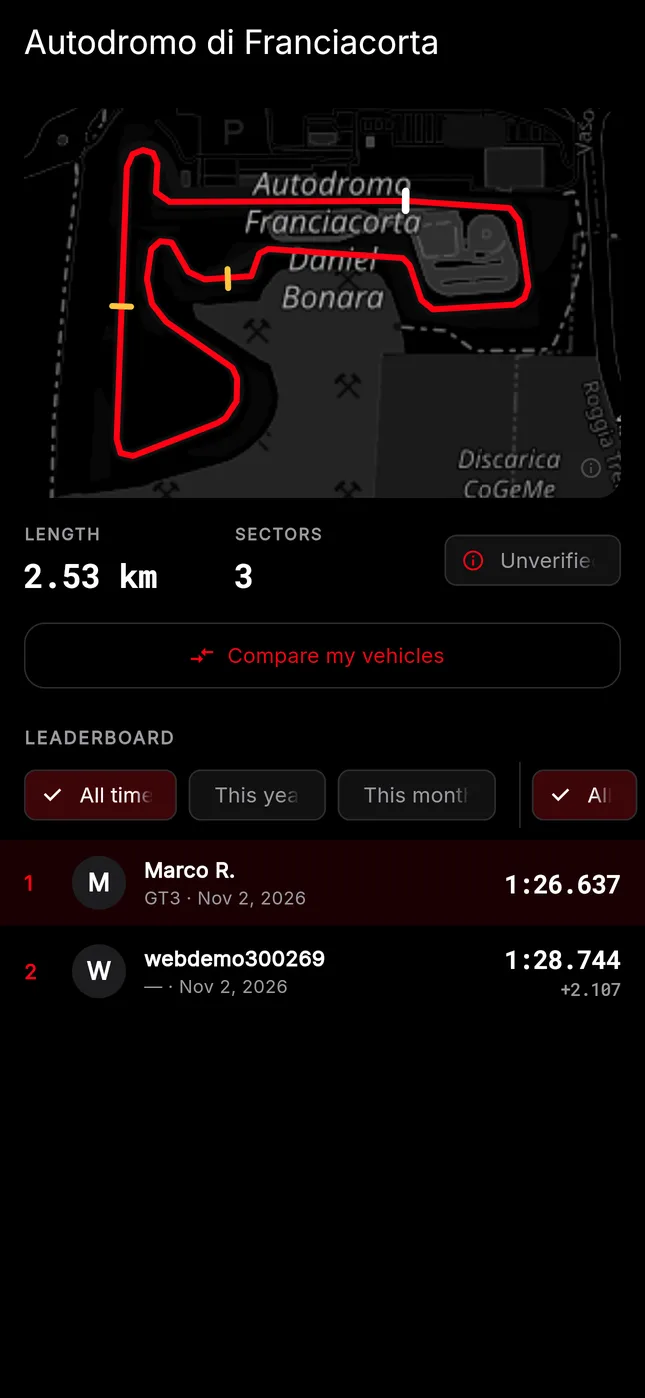
Every circuit and layout has a leaderboard: all time, this year and this month. Laps are checked against the GPS trace before they count.
- A leaderboard for each layout, for cars, bikes, karts and formula cars
- Pit laps and laps with GPS gaps don't count
- Sessions recorded with a fake GPS are left out
- Compare your vehicles on the same layout
On your computer
Your laps, on a big screen
Sign in on your computer to go through your sessions, laps and leaderboards. Everything you record with the phone is there, nothing to install.
Also included
Built for track days
60+ circuits
Circuits across Europe with their layouts and sectors, recognised as soon as you start.
Voice callouts
Lap time, the gap to your best, pit laps and GPS warnings, read out loud.
Nothing lost
Sessions are saved on the phone and upload when you're back online.
English and Italian
In your phone's language, with km/h or mph.
Private when you want
No ads and no tracking. Choose what is public, and delete your account whenever you like.
How it works
Three steps to your first lap
- Mount the phoneInstall Speedy, sign in and put the phone where you can see it.
- DriveStart a session in the pits. Speedy finds the circuit and times every lap.
- AnalyseBack in the paddock, or at home on your computer, see where to find time.
Ready for your next track day?
Download Speedy for iPhone or Android. Your laps are also waiting on the web.
Use Speedy only on closed circuits, and never use your phone while driving.